

Hey there! As a supplier of CAT7 Lan Cables, I often get asked about the difference between CAT7 and CAT7a Lan Cables. It's a question that's crucial for anyone looking to set up a high - speed network, whether it's for a home office, a small business, or a large enterprise. So, let's dive right in and break down the differences between these two types of cables.
1. Basics of CAT7 and CAT7a
First off, both CAT7 and CAT7a are high - performance Ethernet cables designed to support high - speed data transmission. They're part of the category of shielded twisted - pair (STP) cables, which means they have an extra layer of shielding to protect against electromagnetic interference (EMI).
CAT7 cables are built to support frequencies up to 600 MHz. They're great for 10 Gigabit Ethernet connections over distances of up to 100 meters. These cables are commonly used in data centers, corporate networks, and other environments where high - speed and reliable data transfer is a must. You can check out our CAT7 10 Gigabit Ethernet Cable for a top - notch option.
On the other hand, CAT7a (also known as augmented CAT7) takes things a step further. It's designed to support frequencies up to 1000 MHz, which is almost double that of CAT7. This higher frequency range allows for even faster data transmission, making it ideal for applications that require extremely high bandwidth, like 4K video streaming, large - scale data transfers, and high - end gaming.
2. Performance
When it comes to performance, the main difference between CAT7 and CAT7a lies in their data transfer rates and frequency capabilities.
As I mentioned earlier, CAT7 cables can handle 10 Gigabit Ethernet speeds. They're more than sufficient for most home and small - business networks. For example, if you're setting up a home network to stream HD content, play online games, or connect multiple smart devices, a CAT7 cable will do the job just fine.
CAT7a cables, however, offer a significant performance boost. They can support data transfer speeds of up to 40 Gigabit Ethernet over shorter distances (up to 50 meters) and 10 Gigabit Ethernet over longer distances (up to 100 meters). This makes them a better choice for large - scale data centers, high - end corporate networks, and other environments where high - speed data transfer is critical.
3. Construction and Shielding
Another key difference between CAT7 and CAT7a is their construction and shielding.
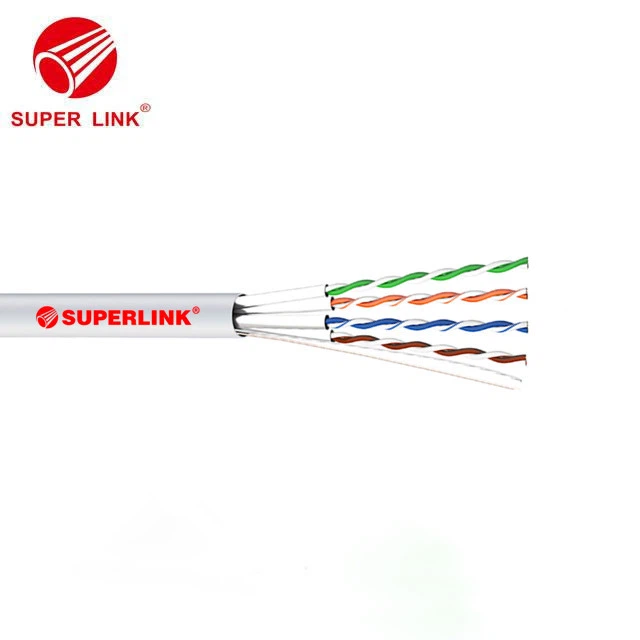

CAT7 cables typically have a four - pair design, with each pair individually shielded. This individual shielding helps to reduce crosstalk, which is the interference that can occur between different pairs of wires within the cable. In addition to the individual shielding, CAT7 cables also have an overall shield, which provides additional protection against EMI.
CAT7a cables have a similar construction, but they're built to higher standards. They often have thicker shielding and better insulation, which helps to minimize signal loss and improve overall performance. The extra shielding also makes CAT7a cables more resistant to external interference, which is especially important in environments with a lot of electrical noise.
4. Cost
Cost is always a factor when choosing between different types of cables. Generally speaking, CAT7a cables are more expensive than CAT7 cables. This is because they offer higher performance and better construction.
For home users or small - business owners on a budget, CAT7 cables are a more cost - effective option. They provide a good balance between performance and price, and they're more than adequate for most applications. However, if you're running a large - scale network or need the highest possible performance, the extra cost of CAT7a cables may be worth it.
5. Compatibility
Both CAT7 and CAT7a cables are backward - compatible with lower - category Ethernet cables, such as CAT6 and CAT5e. This means that you can use them in existing networks without having to replace all of your equipment.
However, it's important to note that the performance of the cable will be limited by the lowest - category device in the network. For example, if you're using a CAT7 cable with a CAT5e network switch, you won't be able to take advantage of the full capabilities of the CAT7 cable.
6. Installation
Installation of CAT7 and CAT7a cables is similar, but there are a few things to keep in mind.
Both types of cables are relatively thick and stiff compared to lower - category cables. This can make them a bit more difficult to install, especially in tight spaces. It's important to use the right tools and techniques when installing these cables to ensure a proper connection.
When installing CAT7 or CAT7a cables, it's also important to avoid bending the cables too sharply. Sharp bends can cause signal loss and reduce the performance of the cable.
7. Which One Should You Choose?
So, which cable is right for you? Well, it depends on your specific needs and budget.
If you're setting up a home network or a small - business network and don't need the highest possible performance, a CAT7 cable is a great choice. It's more affordable and provides more than enough speed for most applications.
On the other hand, if you're running a large - scale data center, a high - end corporate network, or an environment that requires extremely high bandwidth, a CAT7a cable is the way to go. It offers superior performance and is better suited for demanding applications.
Conclusion
In conclusion, the main difference between CAT7 and CAT7a Lan Cables lies in their performance, construction, cost, and compatibility. CAT7 cables are a great option for most home and small - business networks, while CAT7a cables are better suited for large - scale networks and high - performance applications.
If you're interested in purchasing CAT7 Lan Cables or have any questions about which cable is right for your needs, feel free to reach out. We're here to help you make the best decision for your network.
References
- Ethernet Cable Standards: A Guide to CAT5e, CAT6, CAT6a, CAT7, and CAT7a. Available in various industry - specific publications.
- Technical specifications provided by cable manufacturers for CAT7 and CAT7a cables.